Ultimate Guide: How to Download TikTok Videos No Watermark via SSSTikTok
TikTok is currently the leading short-form video social network, but its default download feature often leaves annoying watermarks that obscure content. With SSSTikTok, you can easily download high-quality videos without watermarks or logos, providing clean content suitable for sharing, professional editing, or offline viewing.
SSSTikTok.co is a web-based tool that allows you to download your favorite TikTok content to your device without installing any software or apps. The tool also requires no registration or login and does not collect personal data, ensuring absolute safety and anonymity during use.
What Makes SSSTikTok the Best TikTok Video Downloader?
Powerful server system with high-speed processing, ensuring your videos are ready for instant download.
- Minimalist and intuitive interface, designed for a hassle-free experience on both mobile and desktop.
- Web-platform based: No software installation, browser extensions, or account registration required.
- Safety & Security: We do not collect user personal data or store download history. Ensuring absolute safety and anonymity.
- Compatible with all devices and platforms: SSSTikTok.co works smoothly on every device, from mobile phones to desktop computers.
Follow these 4 simple steps to save any TikTok video without watermark using SSSTikTok:
Step 1: Get the TikTok Video Link
Launch the TikTok app or website, find your favorite video, tap Share, and select Copy Link.
Step 2: Access SSSTikTok.co
Open your mobile or desktop browser and go to https://ssstiktok.co/en
Step 3: Paste Link and Process
Insert the link into the search box, click Download, and wait a moment for the system to analyze the video.
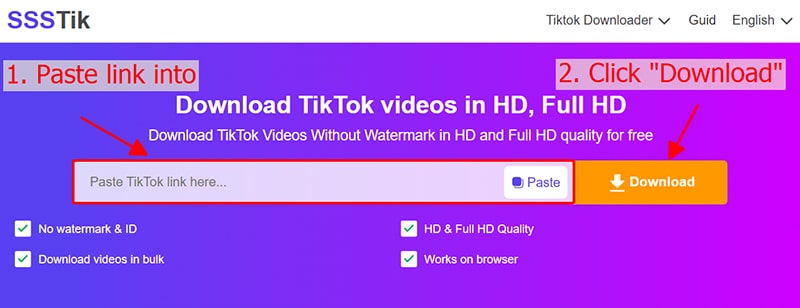
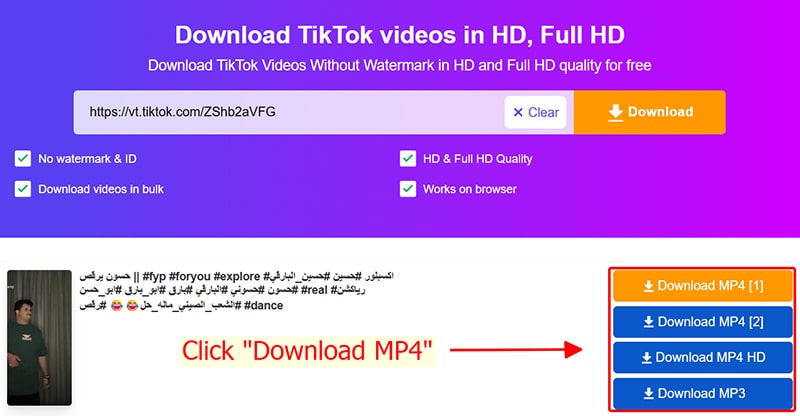
Step 4: Save Video to Device
Select your desired quality, then click the corresponding Download MP4 button to save the video to your device.
Important notes when using SSSTikTok.co
- Universal compatibility: Our tool works perfectly on all modern browsers across Android, iOS, Windows, and macOS.
Where are TikTok videos saved after downloading?:
Copyright and Usage Terms
Content downloaded via SSSTikTok.co is intended for personal use only. We encourage users to respect intellectual property: any commercial reuse or public redistribution must have the explicit consent of the original creator.